
DEVELOPMENT

DEVELOPMENT

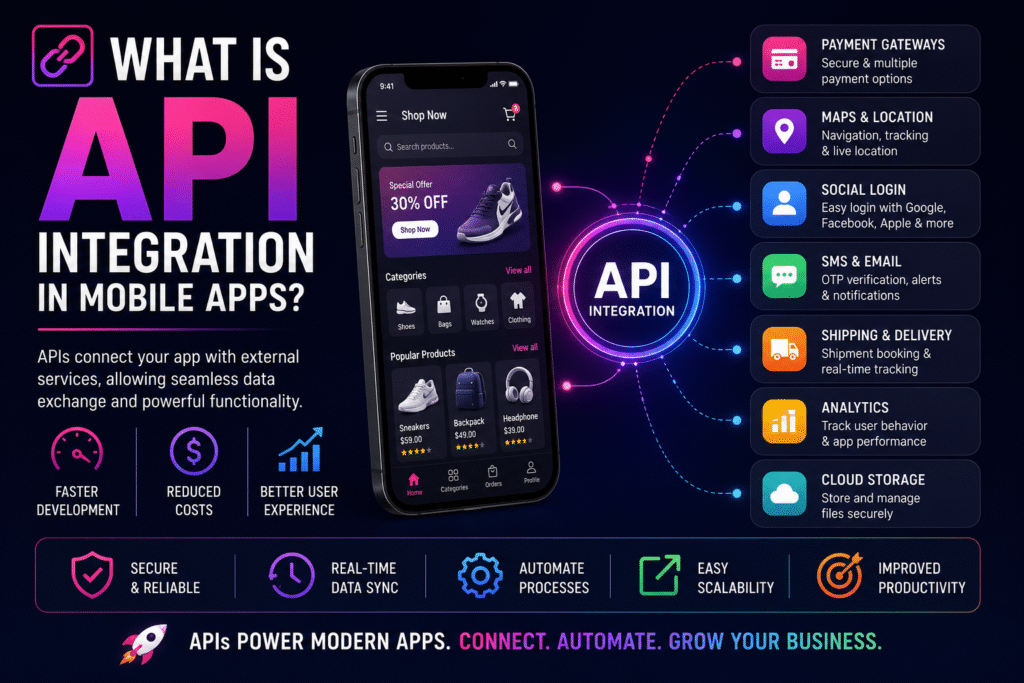
πŸ”— What Is API Integration in Mobile Apps?

πŸš€ How to Automate Your Business with a Custom App Β  Β  πŸ”— Mobile App Development Guide Β  . 8+ API Types 24/7 Automation Fast Integration Scale Business Growth Contents Introduction What is an API? API Integration Why It Matters Payment APIs Part 1 of the premium blog. πŸ“± Introduction Mobile apps have become an essential part of modern businesses, offering online shopping, digital payments, booking systems and real-time tracking. Behind these features is API Integrationβ€”the technology that allows your application to communicate with external systems securely and efficiently. Business Insight: APIs help you launch faster by reusing trusted services instead of building everything from scratch.Mobile AppsBusiness Growth πŸš€ What Is an API? An API (Application Programming Interface) acts as a messenger between two software systems. It receives requests, communicates with another service, and returns the required information within seconds. Think of an API as a waiter taking your order to the kitchen and bringing the finished meal back to your table. πŸ”— What Is API Integration? API integration connects your app with payment gateways, maps, CRMs, cloud storage, social logins, SMS providers and many other services so data flows automatically without manual work. πŸ’‘ Why API Integration Matters Businesses use APIs to reduce development time, improve customer experience, automate operations, access third-party services and scale applications efficiently. πŸ’³ Payment Gateway Integration Integrating payment APIs such as Razorpay, Stripe or PayPal enables secure online payments, multiple payment options and faster checkout experiences for customers. API Integration in Mobile Apps Premium Blog β€’ Part 2 β€” Core API integrations and business use cases. πŸ“ Google Maps Integration Map APIs allow businesses to display live locations, route navigation, nearby places and real-time delivery tracking. Industries like food delivery, logistics, taxi booking and real estate depend on maps to improve customer experience. Business Insight: Live tracking builds trust and reduces customer support requests.MapsTrackingLocationπŸ” Social Login Integration Users can sign in using Google, Apple ID, Facebook or LinkedIn instead of creating new accounts. This reduces friction during registration and improves user onboarding. Benefits: Faster sign-ups, better user experience and higher conversion rates.GoogleAppleOAuthπŸ“© SMS & Email APIs Messaging APIs automate OTP verification, appointment reminders, order confirmations, invoices and marketing campaigns using providers like Twilio, MSG91 and SendGrid. Business Insight: Automated communication keeps customers informed and engaged.OTPEmailNotificationsπŸ“¦ Shipping & Delivery APIs E-commerce businesses integrate courier APIs to create shipments, track packages, update delivery status and manage logistics from one place. Benefits: Better transparency, smoother delivery workflows and happier customers.LogisticsCourierE-commerceΒ  Analytics APIs Analytics platforms help monitor downloads, active users, screen views, purchases and retention. These insights support better marketing and product decisions. Business Insight: Data-driven decisions improve ROI and product growth.AnalyticsInsightsGrowth☁️ Cloud Storage APIs Cloud integrations allow apps to securely store images, videos, documents and customer data while ensuring high availability and scalability. Benefits: Reliable storage, faster access and effortless scaling.CloudStorageScalabilitytable>IntegrationPrimary PurposeBusiness ValueMaps APINavigation & TrackingReal-time customer updatesSocial LoginAuthenticationHigher registrationsSMS/EmailNotificationsBetter communicationShipping APIDelivery ManagementImproved logisticsAnalytics APIUser BehaviourSmarter business decisionsCloud APIData StorageReliable infrastructure API Integration in Mobile Apps β€” Part 3 🏒 Business Software Integration Custom mobile apps can connect with CRM, ERP, inventory, accounting and HR systems to eliminate duplicate work and automate operations. Information flows between systems in real time, improving productivity and reducing manual errors. Business Insight: Integrating existing software protects your investment while improving operational efficiency. πŸ“ˆ Benefits of API Integration API integration enables faster development, lower costs, real-time synchronization, better automation, improved customer experience, higher productivity and effortless scalability. Businesses can launch new features quickly by using trusted third-party services instead of building everything from scratch. ⚠️ Challenges of API Integration Businesses should evaluate API security, rate limits, third-party downtime, version updates and documentation quality. Proper planning and experienced developers help minimize these risks. Tip: Always choose APIs with strong documentation, active support and long-term reliability. 🌟 Real-World Example An online grocery app uses multiple APIs simultaneously. Payment APIs process transactions, inventory APIs check stock, notification APIs send confirmations, delivery APIs assign drivers and Google Maps APIs provide live tracking. All of these services work together seamlessly to create an excellent customer experience. Β  πŸš€ How to Choose the Right APIs Choose APIs based on security, scalability, performance, documentation quality, pricing, uptime and customer support. Trusted providers reduce future maintenance and ensure stable application performance as your business grows. πŸ’‘ Final Thoughts API integration is the backbone of modern mobile applications. It enables apps to communicate with external services, automate business processes and deliver seamless digital experiences. Whether you’re building an e-commerce platform, healthcare app, booking solution or enterprise system, choosing the right APIs will improve performance, accelerate development and support long-term business growth. ❓Quick FAQs What is an API?A bridge that allows software systems to communicate. Why use APIs?To save development time and add trusted functionality. Are APIs secure?Yes, when implemented with authentication, encryption and best practices. Ready to Build a Powerful Mobile App? Leverage secure API integrations to create scalable, feature-rich applications that delight your users and streamline your business. Start Your Project Submit your request Recent Post What Is Custom Software?

DEVELOPMENT

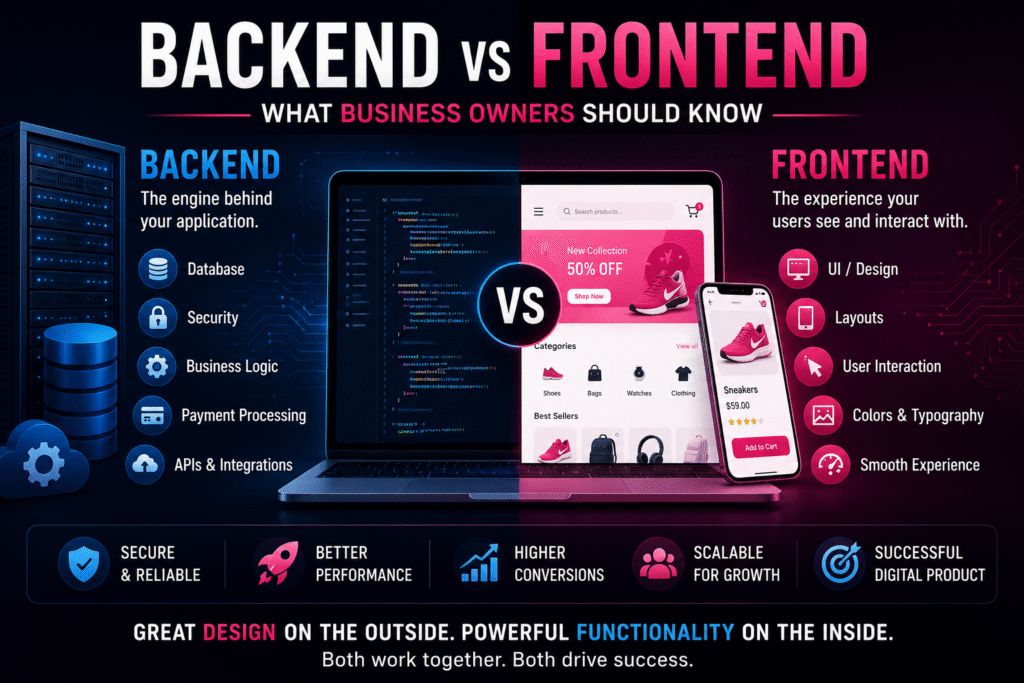
πŸ–₯️ Backend vs Frontend: What Business Owners Should Know

πŸš€ How to Automate Your Business with a Custom App Backend vs Frontend: What Business Owners Should Know Backend vs Frontend: What Business Owners Should Know Understanding both frontend and backend development helps business owners communicate better with developers, plan projects effectively, and build reliable digital products. 🌐 What Is Frontend Development? Frontend development is the part of your website or mobile app that customers directly see and interact with. It includes the home page, navigation, product pages, dashboards, forms, buttons, images, animations, and overall design. A well-crafted frontend creates a strong first impression and makes it easy for users to complete actions such as purchasing products or booking services. Business Value: Better user experience leads to higher engagement, trust, and conversions. UIUXCustomer Experience βš™οΈ What Is Backend Development? The backend is the engine that powers your application behind the scenes. It manages databases, authentication, business logic, payment processing, APIs, notifications, and security. Without a backend, a website can display information but cannot process user actions or store data securely. Business Value: A strong backend ensures reliability, security, scalability, and smooth operations. APIDatabaseSecurity πŸ“Š Backend vs Frontend Comparison Feature Frontend Backend Visible to Users Yes No Main Focus User Interface & Experience Business Logic & Data Handles Layouts, Forms, Navigation Server, Database, APIs Technologies React, Vue, Flutter Node.js, Laravel, Django πŸ”„ How They Work Together When a customer places an order, the frontend collects the information while the backend validates the payment, checks inventory, stores the order, and sends confirmation messages. Neither can function effectively without the other. A successful digital product balances a beautiful interface with a powerful technical foundation. πŸ’‘ Final Thoughts Frontend attracts users and delivers an engaging experience. Backend keeps your business running efficiently by processing data, securing information, and supporting growth. Investing in both ensures your website or app is visually appealing, reliable, and ready to scale. Submit your request Recent Post What Is Custom Software?

DEVELOPMENT

πŸ–₯️ Backend vs Frontend: What Business Owners Should Know

πŸš€ How to Automate Your Business with a Custom App Backend vs Frontend πŸ–₯️ Business Guide Backend vs Frontend: What Business Owners Should Know Learn how both layers work together to build successful digital products. 2 Core Layers UX Frontend API Backend 100% Business Ready Comparison Feature Frontend Backend Visible Yes No Focus UI/UX Logic & Database Goal User Experience Business Operations πŸ–₯️ What Is Frontend Development? Everything users see and interact with. Business Insight: Both frontend and backend are essential for delivering a secure, scalable and engaging application.FrontendBackendGrowthβš™οΈ What Is Backend Development? Server-side logic, databases, APIs and security. Business Insight: Both frontend and backend are essential for delivering a secure, scalable and engaging application.FrontendBackendGrowth🎯 Frontend vs Backend Frontend delivers experience; backend powers functionality. Business Insight: Both frontend and backend are essential for delivering a secure, scalable and engaging application.FrontendBackendGrowthπŸ“± Why Frontend Matters Improves engagement and conversions. Business Insight: Both frontend and backend are essential for delivering a secure, scalable and engaging application.FrontendBackendGrowthπŸ” Why Backend Matters Provides speed, security and scalability. Business Insight: Both frontend and backend are essential for delivering a secure, scalable and engaging application.FrontendBackendGrowthπŸ”„ How They Work Together Frontend sends actions, backend processes data. Business Insight: Both frontend and backend are essential for delivering a secure, scalable and engaging application.FrontendBackendGrowthπŸ’³ Food Delivery Example Frontend for ordering, backend for processing. Business Insight: Both frontend and backend are essential for delivering a secure, scalable and engaging application.FrontendBackendGrowthπŸ—οΈ Which Is More Important? Both are equally important. Business Insight: Both frontend and backend are essential for delivering a secure, scalable and engaging application.FrontendBackendGrowthπŸ“Š Frontend Investment Best for customer-facing apps. Business Insight: Both frontend and backend are essential for delivering a secure, scalable and engaging application.FrontendBackendGrowthβš™οΈ Backend Investment Best for data-heavy systems. Business Insight: Both frontend and backend are essential for delivering a secure, scalable and engaging application.FrontendBackendGrowth🚨 Common Mistakes Ignoring scalability and security. Business Insight: Both frontend and backend are essential for delivering a secure, scalable and engaging application.FrontendBackendGrowthπŸ’Ό Choosing the Right Partner Hire experts in both. Business Insight: Both frontend and backend are essential for delivering a secure, scalable and engaging application.FrontendBackendGrowth πŸ’‘ Final Thoughts A successful digital product combines beautiful design with powerful backend technology. Start Your Project Submit your request Recent Post What Is Custom Software?

DEVELOPMENT

🎨 UI/UX Design Process Explained for Business Owners

πŸš€ How to Automate Your Business with a Custom App UI UX Design Process 🎨 Business Owner Guide UI/UX Design Process Explained Understand the complete UI/UX workflow from discovery to continuous improvement. 10+ Stages UX User First UI Modern Design 100% Responsive πŸš€ What Is UI Design? Visual elements users interact with. Business Impact: Better user experience improves engagement and conversions.DesignUXGrowthπŸ’‘ What Is UX Design? Overall experience and usability. Business Impact: Better user experience improves engagement and conversions.DesignUXGrowthπŸ€” Why UI/UX Matters Improves engagement, trust and conversions. Business Impact: Better user experience improves engagement and conversions.DesignUXGrowthπŸ“‹ Business Discovery Understand goals and audience. Business Impact: Better user experience improves engagement and conversions.DesignUXGrowthπŸ‘₯ User Research Analyze users and pain points. Business Impact: Better user experience improves engagement and conversions.DesignUXGrowthπŸ—ΊοΈ User Journey Mapping Map user interactions. Business Impact: Better user experience improves engagement and conversions.DesignUXGrowth✏️ Wireframing Blueprints before visuals. Business Impact: Better user experience improves engagement and conversions.DesignUXGrowth🎨 UI Design Brand colors, typography and components. Business Impact: Better user experience improves engagement and conversions.DesignUXGrowthπŸ“± Interactive Prototyping Clickable experience before coding. Business Impact: Better user experience improves engagement and conversions.DesignUXGrowthπŸ§ͺ Usability Testing Validate with real users. Business Impact: Better user experience improves engagement and conversions.DesignUXGrowthβš™οΈ Design Handoff Assets and specs for developers. Business Impact: Better user experience improves engagement and conversions.DesignUXGrowthπŸš€ Development Support Maintain consistency. Business Impact: Better user experience improves engagement and conversions.DesignUXGrowthπŸ“Š Continuous Improvement Iterate with analytics. Business Impact: Better user experience improves engagement and conversions.DesignUXGrowth🎯 Key Principles Simple, fast, consistent. Business Impact: Better user experience improves engagement and conversions.DesignUXGrowth🚨 Common Mistakes Clutter and poor navigation. Business Impact: Better user experience improves engagement and conversions.DesignUXGrowthπŸ’Ό Why Hire Professionals? Save time and improve quality. Business Impact: Better user experience improves engagement and conversions.DesignUXGrowth πŸ’‘ Final Thoughts Good UI/UX creates products people enjoy using while supporting your business goals. Start Your Design Journey Submit your request Recent Post What Is Custom Software?

DEVELOPMENT

πŸš€ What Happens Inside an App Development Project?

πŸš€ How to Automate Your Business with a Custom App Premium App Development Project Blog πŸš€ Complete Development Lifecycle What Happens Inside an App Development Project? Every successful mobile application follows a structured journeyβ€”from discovery and planning to launch and continuous improvement. 10+ Project Stages 6–16 Weeks Development 100% Quality Focus 24/7 Post Launch Support πŸ’‘ Why Understanding the Process Matters Plan budgets, set realistic expectations, collaborate better, reduce project risks and build scalable apps. Key Deliverable: Clear documentation, collaboration and continuous feedback at every stage. PlanningQualityScalable πŸ“ Discovery & Requirement Gathering Define business goals, target audience, features, competitor analysis, technical requirements and project scope. Key Deliverable: Clear documentation, collaboration and continuous feedback at every stage. PlanningQualityScalable 🎯 Planning & Strategy Prepare timelines, milestones, technology stack, resource allocation and risk management. Key Deliverable: Clear documentation, collaboration and continuous feedback at every stage. PlanningQualityScalable 🎨 UI/UX Design Create wireframes, user flows, high-fidelity mockups and interactive prototypes. Key Deliverable: Clear documentation, collaboration and continuous feedback at every stage. PlanningQualityScalable βš™οΈ App Development Frontend, backend, APIs, authentication, database and server-side logic. Key Deliverable: Clear documentation, collaboration and continuous feedback at every stage. PlanningQualityScalable πŸ”— Third-Party Integrations Payments, Maps, Analytics, Social Login, Push Notifications and Email/SMS. Key Deliverable: Clear documentation, collaboration and continuous feedback at every stage. PlanningQualityScalable πŸ§ͺ Testing & QA Functional, security, compatibility, performance and user acceptance testing. Key Deliverable: Clear documentation, collaboration and continuous feedback at every stage. PlanningQualityScalable πŸš€ Deployment Publish to Google Play and Apple App Store after production setup. Key Deliverable: Clear documentation, collaboration and continuous feedback at every stage. PlanningQualityScalable πŸ“Š Monitoring & Maintenance Analytics, crash monitoring, updates, security patches and feature improvements. Key Deliverable: Clear documentation, collaboration and continuous feedback at every stage. PlanningQualityScalable ⏳ Typical Timeline Phase Duration Discovery & Planning 1–2 Weeks UI/UX Design 2–4 Weeks Development 6–16 Weeks Testing 2–4 Weeks Launch 1–2 Weeks Maintenance Ongoing πŸ’‘ Final Thoughts Understanding every stage of the app development lifecycle helps businesses make informed decisions, reduce risks and build products that are scalable, secure and user-friendly. Start Your Project Submit your request Recent Post What Is Custom Software?

DEVELOPMENT

πŸ“± How Local Businesses in Hubli & Bangalore Can Scale Using Mobile Apps

πŸš€ How to Automate Your Business with a Custom App Hubli & Bangalore Mobile Apps πŸ“± Karnataka Business Growth How Local Businesses in Hubli & Bangalore Can Scale Using Mobile Apps Customers expect businesses to be available anytime, anywhere. Mobile apps help improve customer experience, increase revenue and automate operations. πŸš€ Why Local Businesses Need Mobile Apps Online ordering Instant booking Digital payments Personalized offers Fast customer support πŸ“ Why Hubli & Bangalore? Hubli: Retail, Healthcare, Restaurants, Education, Real Estate Bangalore: Technology hub with digital-first customers πŸ“± Improve Customer Experience Browse products Book appointments Place orders Payments Support πŸ’° Increase Sales One-click ordering Recommendations Push notifications Rewards Offers βš™οΈ Automate Operations Scheduling Inventory Billing Customer records Order tracking πŸ“Š Better Decisions Customer insights Sales trends Revenue reports Popular products πŸ›’ Expand Markets Serve Karnataka Reach more cities Grow customer base πŸͺ Industries Retail Healthcare Restaurants Real Estate Education Beauty Professional Services πŸš€ Why Custom Apps? Personalized features Security Scalable architecture Unique branding Integrations πŸ’‘ Final Thoughts Investing in a custom mobile app helps local businesses improve customer experience, automate operations, increase sales and scale confidently. πŸš€ Get Free ConsultationπŸ’¬ WhatsApp Submit your request Recent Post What Is Custom Software?

DEVELOPMENT

πŸš€ Top Industries That Need Mobile Apps in 2026

πŸš€ How to Automate Your Business with a Custom App Top Industries That Need Mobile Apps in 2026 πŸš€ 2026 Business Growth Guide Top Industries That Need Mobile Apps in 2026 Mobile apps have become essential for businesses looking to improve customer experience, automate operations, increase revenue, and stay competitive in a mobile-first world. 12+ Industries Covered 24/7 Customer Access ↑ Customer Engagement 2026 Digital Ready πŸ›’ Retail & E‑Commerce Key FeaturesOnline shopping, secure payments, order tracking, loyalty rewards. BenefitsHigher sales β€’ Better retention β€’ Personalized shopping πŸ₯ Healthcare Key FeaturesAppointments, telemedicine, records, reminders. BenefitsBetter patient experience β€’ Improved accessibility 🍽️ Restaurants Key FeaturesOrdering, reservations, payments, rewards. BenefitsFaster ordering β€’ Repeat customers 🚚 Logistics Key FeaturesGPS, fleet management, route optimization. BenefitsBetter efficiency β€’ Delivery tracking 🏑 Real Estate Key FeaturesListings, virtual tours, booking. BenefitsLead generation β€’ Customer engagement πŸŽ“ Education Key FeaturesOnline classes, assignments, certificates. BenefitsFlexible learning β€’ Student engagement πŸ’Ό Professional Services Key FeaturesDocuments, appointments, notifications. BenefitsProductivity β€’ Better communication 🏨 Travel Key FeaturesBooking, itineraries, digital check‑in. BenefitsGuest experience β€’ Loyalty 🏭 Manufacturing Key FeaturesInventory, production, maintenance. BenefitsVisibility β€’ Reduced downtime πŸ’³ Finance Key FeaturesBanking, transfers, alerts. BenefitsSecure transactions β€’ Convenience πŸš— Automotive Key FeaturesBookings, servicing, tracking. BenefitsConvenience β€’ Retention πŸ’‡ Beauty & Fitness Key FeaturesMemberships, appointments, classes. BenefitsScheduling β€’ Membership growth Does Your Business Need a Mobile App? If customers interact with your business regularly, a custom mobile app can improve engagement, automate operations, and unlock new revenue opportunities. πŸš€ Get Free Consultation Β© Crawlers Technologies β€’ Premium WordPress Blog Template πŸ’¬ WhatsApp Submit your request Recent Post What Is Custom Software?

DEVELOPMENT

πŸš€ How to Automate Your Business with a Custom App

πŸš€ How to Automate Your Business with a Custom App How to Automate Your Business with a Custom App | Crawlers Technologies πŸš€ How to Automate Your Business with a Custom App In today’s fast-paced business environment, efficiency is everything. As businesses grow, managing daily operations manually becomes time-consuming, costly, and prone to errors. A custom app can automate repetitive tasks, streamline workflows, improve communication, and help you focus on what matters most β€” growing your business. Whether you run a retail store, healthcare clinic, logistics company, educational institution, or service-based business β€” a custom app can transform the way you operate. πŸ€– What Is Business Automation? Business automation is the use of technology to perform repetitive tasks with minimal human intervention. Instead of handling tasks manually, automation allows software to complete them quickly and accurately. Common examples include: πŸ“… Appointment booking 🧾 Invoice generation πŸ“¦ Inventory management πŸ‘₯ Attendance tracking πŸ›’ Order processing πŸ”” Customer notifications Automation helps businesses save time, reduce costs, and improve productivity. 1 Automate Customer Management Managing customer information manually can be challenging as your business grows. A custom app can automatically handle your entire customer lifecycle. πŸ“‹ What It Automates Store customer details Track purchase history Manage customer inquiries Send personalized offers Schedule follow-ups βœ… Benefits βœ”Better customer relationships βœ”Faster customer support βœ”Improved customer satisfaction 2 Streamline Order & Inventory Management Businesses dealing with products often struggle with inventory tracking. A custom app brings real-time visibility and full automation to your supply chain. πŸ“¦ What It Automates Inventory updates Low-stock alerts Purchase orders Order tracking Delivery management βœ… Benefits βœ”Reduce stock shortages βœ”Avoid overstocking βœ”Improve order accuracy 3 Simplify Billing & Payments Manual billing takes time and increases the chances of errors. A custom app transforms your entire payment workflow. πŸ’³ What It Automates Generate invoices automatically Accept online payments Track payment history Send payment reminders Create financial reports βœ… Benefits βœ”Faster transactions βœ”Better cash flow βœ”Reduced paperwork 4 Automate Appointment & Booking Systems For clinics, salons, consultants, and service providers, appointment scheduling is critical. Let customers self-serve 24/7. πŸ“… What Customers Can Do Book appointments Reschedule visits Cancel bookings Receive automated reminders βœ… Benefits βœ”Fewer missed appointments βœ”Better time management βœ”Improved customer experience 5 Improve Employee Management A custom business app can automate HR processes and reduce administrative burden across your entire organization. πŸ‘¨β€πŸ’Ό What It Automates Attendance tracking Leave management Shift scheduling Task assignments Performance reports βœ… Benefits βœ”Increased employee productivity βœ”Reduced administrative workload βœ”Better workforce management 6 Automate Customer Communication Keeping customers informed builds trust. Your app can automatically send the right message at the right moment. βœ… Order confirmations 🚚 Delivery updates 🎁 Promotional offers πŸ”” Service reminders ⭐ Feedback requests βœ”Higher customer engagement βœ”Improved retention βœ”Stronger brand loyalty 7 Monitor Business Performance in Real Time A custom dashboard provides instant access to important business metrics β€” all in one place. πŸ“Š Track In Real Time Sales performance Revenue trends Customer activity Employee productivity Inventory status βœ… Benefits βœ”Better decision-making βœ”Faster response to challenges βœ”Improved operational visibility 8 Send Smart Notifications Apps can automate targeted notifications that keep your entire operation running smoothly. πŸ›’ New orders πŸ’³ Pending payments πŸ“¦ Inventory shortages ⏰ Task deadlines πŸ“… Appointment reminders βœ”Improved workflow βœ”Faster response times βœ”Better coordination across teams 9 Secure Business Data Custom apps help centralize and secure important business information with enterprise-grade protection. πŸ” Security Features User authentication Role-based access control Cloud backup Data encryption βœ… Benefits βœ”Improved security posture βœ”Better compliance βœ”Reduced risk of data loss 10 Scale Your Business Easily As your business grows, your custom app grows with it β€” unlike off-the-shelf solutions that hit a ceiling. βž• New features πŸ‘₯ Additional users 🏒 Multiple branches πŸ”— Third-party integrations πŸ“ˆ Advanced analytics Custom apps are designed to evolve with your business β€” not hold it back. 🌟 Industries That Benefit from Business Automation Custom business apps can automate operations in almost every industry: πŸ₯ Healthcare πŸ›οΈ Retail & E-commerce 🍽️ Restaurants & Food 🏠 Real Estate πŸŽ“ Education 🏭 Manufacturing 🚚 Logistics πŸ’° Finance ✈️ Travel & Hospitality πŸ’Ό Professional Services Regardless of your industry, automation improves efficiency and customer satisfaction. πŸ’‘ Final Thoughts Business automation is no longer a luxury β€” it’s a necessity. A custom mobile app enables businesses to eliminate repetitive tasks, improve operational efficiency, and provide better customer experiences. By automating key business processes, you can: βœ”Save time βœ”Minimize human errors βœ”Reduce operational costs βœ”Improve customer satisfaction βœ”Increase productivity βœ”Scale with confidence Investing in a custom app today can help your business become more efficient, competitive, and future-ready. πŸš€ Build Your Custom App πŸ’¬ WhatsApp Us Submit your request Recent Post What Is Custom Software?

DEVELOPMENT

πŸš€ Benefits of Custom Apps Over SaaS Tools

πŸš€ Benefits of Custom Apps Over SaaS Tools Benefits of Custom Apps Over SaaS Tools πŸš€ Benefits of Custom Apps Over SaaS Tools In today’s digital landscape, businesses rely heavily on software to streamline operations, improve customer experiences, and drive growth. While SaaS tools offer convenience and quick deployment, they often come with limitations that can restrict long-term growth. Custom applications are designed specifically for your business needs, giving you greater flexibility, control, and scalability. πŸ“± What Are SaaS Tools? SaaS tools are cloud-based software solutions businesses subscribe to monthly or annually. CRM Platforms Project Management Tools Accounting Software Marketing Automation Platforms πŸ’‘ What Is a Custom App? A custom app is developed specifically around your business requirements. Your workflows Your business goals Your customer needs Your operational processes 🎯 1. Tailored to Your Business Needs Unlike SaaS tools, custom apps adapt to your businessβ€”not the other way around. βœ” Customized workflows βœ” Business-specific features βœ” Better efficiency βœ” Higher productivity πŸ’° 2. No Recurring Subscription Costs SaaS tools require ongoing monthly payments, user licenses, and premium feature upgrades. A β‚Ή20,000/month SaaS subscription can cost over β‚Ή12 lakhs in 5 years. πŸš€ 3. Better Scalability βœ” Add features anytime βœ” Support more users βœ” Adapt to changing needs Your app grows as your business grows. πŸ” 4. Enhanced Security & Data Control βœ” Control data storage βœ” Manage permissions βœ” Define security policies βœ” Meet compliance requirements βš™οΈ 5. Seamless Integration Connect directly with: CRM Systems ERP Platforms Accounting Software Payment Gateways Internal Databases πŸ“Š 6. Improved Performance & Speed βœ” Faster load times βœ” Better responsiveness βœ” Optimized user experience 🎨 7. Stronger Branding & Customer Experience βœ” Custom brand colors βœ” Unique UI/UX βœ” Personalized customer journeys βœ” Consistent brand identity πŸ“ˆ 8. Competitive Advantage Custom apps allow businesses to offer unique features and experiences that competitors using standard SaaS tools cannot. πŸ€– 9. Greater Automation Opportunities Order Processing Customer Onboarding Inventory Management Appointment Scheduling Internal Approvals πŸ”„ 10. Complete Ownership & Control βœ” Full ownership βœ” No vendor lock-in βœ” Unlimited upgrades βœ” Freedom to modify anytime πŸ“Š Custom App vs SaaS Tool Comparison Feature Custom App SaaS Tool Customization High Limited Scalability High Moderate Ownership Full Vendor-Owned Security Control High Limited Long-Term Cost Lower Higher Branding Fully Custom Limited Flexibility High Restricted πŸ’‘ Final Thoughts SaaS tools are excellent for quick deployment and simple requirements. However, growing businesses often outgrow their limitations. βœ” Complete Ownership βœ” Better Scalability βœ” Stronger Security βœ” Personalized Experiences βœ” Long-Term Cost Efficiency Investing in a custom app can be one of the smartest decisions for building a future-ready business. πŸš€ Build Your Custom App πŸ’¬ WhatsApp Us Submit your request Recent Post What Is Custom Software?

DEVELOPMENT

πŸ“± How to Digitize Your Business with a Custom App

πŸ“± How to Digitize Your Business with a Custom App How to Digitize Your Business with a Custom App πŸ“± How to Digitize Your Business with a Custom App In 2026, businesses that embrace digital transformation are growing faster than ever. Customers now expect convenience, speed, and accessibility directly from their smartphones. One of the most powerful ways to digitize your business is through a custom mobile app. A custom app helps businesses automate operations, improve engagement, increase sales, and build a strong digital presence. πŸš€ What Does It Mean to Digitize Your Business? Digitizing your business means using technology to improve and automate operations, customer interactions, and service delivery. βœ” Manage customers βœ” Accept online payments βœ” Handle bookings/orders βœ” Automate communication βœ” Track performance Digital businesses are faster, smarter, and more scalable. πŸ’‘ Why Choose a Custom App Instead of Generic Software? Generic software may not fully match your business needs. A custom app is built specifically for: Your workflow Your customers Your business goals Benefits of Custom Apps: βœ” Personalized features βœ” Better scalability βœ” Stronger security βœ” Unique branding βœ” Improved user experience πŸ“Š 1. Identify Your Business Needs What problems you want to solve Which processes need automation What your customers expect Examples: Online ordering Appointment booking Delivery tracking Customer management Clear goals lead to better app development. πŸ‘₯ 2. Understand Your Target Audience βœ” Customer behavior βœ” Preferred features βœ” Mobile usage patterns βœ” Pain points A customer-focused app increases adoption and engagement. 🎨 3. Build a User-Friendly Experience Be simple to use Load quickly Have smooth navigation Work on all devices Great design improves customer satisfaction. βš™οΈ 4. Add Features That Improve Operations Popular Features: User login/signup Payment integration Push notifications Analytics dashboard Order management CRM integration Automation saves time and reduces costs. πŸ’³ 5. Enable Online Payments & Transactions βœ” UPI payments βœ” Credit/debit cards βœ” Wallet integration βœ” Subscription systems Easy payments increase convenience and sales. πŸ“’ 6. Improve Customer Communication Push notifications In-app chat support Personalized offers Customer feedback systems Better communication builds stronger customer relationships. πŸ“ˆ 7. Use Analytics for Better Decisions User activity Sales performance Customer preferences Retention rates Data-driven decisions accelerate business growth. πŸ” 8. Focus on Security & Scalability βœ” Secure βœ” Scalable βœ” Future-ready Your app should support: More users More transactions New features πŸš€ 9. Launch & Market Your App Publish on app stores Promote on social media Run marketing campaigns Encourage downloads Marketing is essential for app success. πŸ”„ 10. Continuously Improve Your App βœ” Update features βœ” Fix bugs βœ” Improve performance βœ” Add requested features Businesses that improve continuously stay ahead. πŸ’‘ Final Thoughts Digitizing your business with a custom app is one of the smartest investments you can make in 2026. βœ” Increase efficiency βœ” Improve customer experience βœ” Boost revenue βœ” Automate operations βœ” Scale faster The future belongs to businesses that embrace digital transformation early. πŸš€ Start Your Digital Transformation πŸ’¬ WhatsApp Us Submit your request Recent Post What Is Custom Software?