
MVP Development

DEVELOPMENT

App Development Budget Calculator Guide: How Much Should You Budget for Your App in 2026?

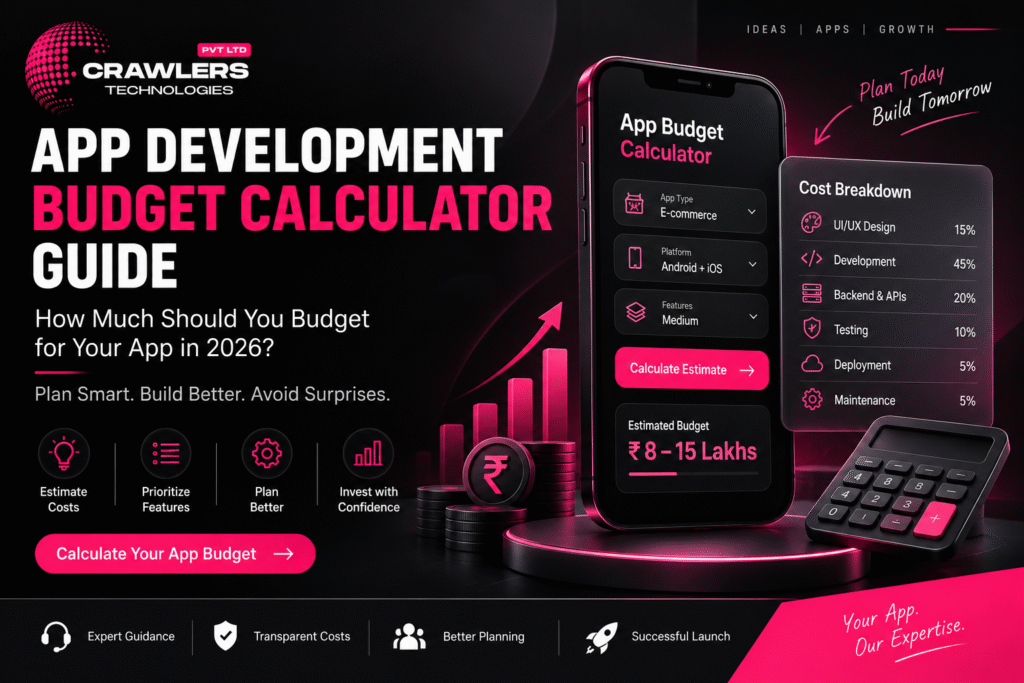
πŸš€ How to Automate Your Business with a Custom App App Development Budget Calculator 2026 | Crawlers Technologies Intro Cost Factors App Complexity Live Calculator Example Breakdown Annual Costs MVP vs Full Checklist Final Thoughts Interactive Tool Β· India Β· 2026 App DevelopmentBudget Calculator How much should you budget for your app in 2026? Use this interactive calculator to estimate your total investment β€” from development to post-launch. πŸ’° Live Calculator πŸ“Š Cost Factors πŸš€ MVP vs Full πŸ“… Annual Budget πŸ“‹ Checklist 🚨 Common Mistakes Scroll to estimate your budget The Formula What Determines App Development Cost? Two businesses may build apps with similar purposes but have completely different budgets. There is no single price. Understanding what drives cost helps you plan realistically. The Budget Formula Total App Budget = UI/UX Design + Mobile Development + Backend + Admin Panel + Integrations + Testing + Deployment + Initial Infrastructure Annual Operating Budget = Maintenance + Cloud + APIs + Third-Party Services + Marketing Major Cost Factors Cost Factor Impact on Budget App complexity ● HIGH Number of features ● HIGH UI/UX design quality ◐ MEDIUM–HIGH Platform (Android / iOS / Both) ◐ MEDIUM–HIGH Backend development ● HIGH API & third-party integrations ◐ MEDIUM–HIGH Security requirements ◐ MEDIUM–HIGH Testing & QA ◐ MEDIUM Admin panel ◐ MEDIUM Maintenance (post-launch) ⟳ ONGOING Step 1 Choose Your App Complexity The first step in budget calculation. Click your complexity tier to pre-fill the calculator below with indicative ranges. 🌱 Basic App β‚Ή2L – β‚Ή5L+ Limited functionality, few screens, simple backend Info appBookingUtilityProfile ⚑ Medium App β‚Ή5L – β‚Ή15L+ User accounts, payments, APIs, notifications, admin panel E-commerceBookingEdTechRestaurant πŸ”₯ Complex App β‚Ή15L – β‚Ή50L+ Multiple roles, real-time features, advanced integrations, large-scale infra MarketplaceFintechLogisticsEnterprise Step 2 β€” Interactive πŸ’° Live Budget Calculator Enter your estimated cost for each component. The total updates in real time. Values are pre-filled based on your complexity selection above β€” adjust as needed. 🎨 UI/UX Design User research, wireframes, visual design, prototypes, design system β‚Ή πŸ“± Mobile App Development Frontend, screens, navigation, device features, animations β‚Ή βš™οΈ Backend Development APIs, database, authentication, business logic, notifications β‚Ή πŸ–₯️ Admin Panel / Dashboard Web-based admin to manage users, orders, products, reports β‚Ή πŸ”— API & Third-Party Integrations Payment gateway, maps, SMS, WhatsApp, CRM, social login β‚Ή πŸ§ͺ Testing & Quality Assurance Functional, UI, performance, security, device, regression testing β‚Ή πŸš€ Deployment & Infrastructure App Store accounts, cloud setup, domain, SSL, initial config β‚Ή Estimated Build Budget β‚Ή8,00,000 Indicative planning estimate β€” actual quotes depend on detailed requirements Budget Breakdown Real-World Example πŸ“Š Example: Service Booking App A business wants to build a service booking application with user registration, OTP login, service listing, booking, payment, notifications, customer profile, booking history, and an admin panel. Illustrative Budget Breakdown Component Example Budget 🎨 UI/UX Design β‚Ή75,000 πŸ“± Mobile App Development β‚Ή3,00,000 βš™οΈ Backend & APIs β‚Ή2,00,000 πŸ–₯️ Admin Panel β‚Ή1,00,000 πŸ’³ Payment Integration β‚Ή30,000 πŸ§ͺ Testing & QA β‚Ή50,000 πŸš€ Deployment β‚Ή25,000 πŸ’° Estimated Total β‚Ή7,80,000 This is an illustrative calculation only. Actual pricing can be significantly different depending on requirements, technology choice, and development team. Don’t Forget This πŸ“… Annual Operating Budget Your app budget doesn’t end when it reaches the Play Store or App Store. Calculate your ongoing annual costs separately β€” many businesses forget this until it’s too late. πŸ”§ Maintenance & Bug Fixes OS updates, security patches, routine fixes β‚Ή ☁️ Cloud Hosting & Servers AWS / GCP / Azure monthly costs β‚Ή πŸ”— API & Third-Party Subscriptions SMS, maps, payment fees, analytics tools β‚Ή ✨ New Features Quarterly feature enhancements based on user feedback β‚Ή πŸ“£ Marketing Google Ads, Meta, ASO, influencers, referral campaigns β‚Ή Annual Operating Budget Cloud + Maintenance + APIs + Features + Marketing β‚Ή3,60,000 Post-Launch Cost Categories πŸ”§ Maintenance Bug fixes, OS updates, security patches ☁️ Infrastructure Servers, databases, storage, backups πŸ”— APIs SMS, maps, payment fees, analytics πŸ“£ Marketing Ads, ASO, referrals, content Smart Strategy πŸš€ MVP vs Full App: Which Budget to Choose? If budget is limited, you don’t need to build everything at once. An MVP focuses on the most important features needed to validate the business idea β€” then you expand based on real feedback. βœ… MVP β€” Launch First Login & registration Product / service catalogue Product / service detail Cart / booking Checkout & payment Order / booking tracking Basic notifications β—‡ Full App β€” Add Later AI-powered recommendations Loyalty & referral programs Multiple payment options Advanced reviews & ratings Advanced analytics AI chatbot Subscription tier The MVP can launch earlier and help you understand what customers actually use. Then invest in additional features based on real data β€” not assumptions. Before You Quote πŸ“‹ Budget Readiness Checklist Answer these questions before requesting a development quotation. The clearer your brief, the more accurate the estimate you’ll receive. πŸ’‘ Business Problem the app solves is defined Target users clearly identified Business model decided Revenue strategy planned πŸ“± Features Must-have features listed Future features separated from MVP User roles identified Admin panel requirement decided βš™οΈ Technology Android / iOS / Both decided Native vs cross-platform discussed Backend requirements identified Required APIs and integrations listed πŸ’° Budget UI/UX budget allocated Development budget set Backend and integrations budgeted Testing budget included Deployment costs considered Maintenance budget planned separately Cloud infrastructure costs included Marketing budget allocated 🚨 Common App Budget Mistakes βœ— Choosing the Cheapest Quote Poor architecture and weak testing create expensive problems later βœ— Building Too Many Features Unnecessary spending before validating the idea βœ— Ignoring Backend Costs The mobile interface is only one part of the system βœ— Forgetting Maintenance Apps require updates as OS, devices, and APIs change βœ— Not Clarifying Ownership Source code, designs, and IP must be in writing before payment Summary πŸ’‘ Final Thoughts Ask the Right Question ❌ Wrong Question “How much does an app cost?” βœ… Right Question “What exactly do I need, what should I build first, and what will it cost to operate long
Uncategorized

πŸ“± App Planning Template for Business Owners

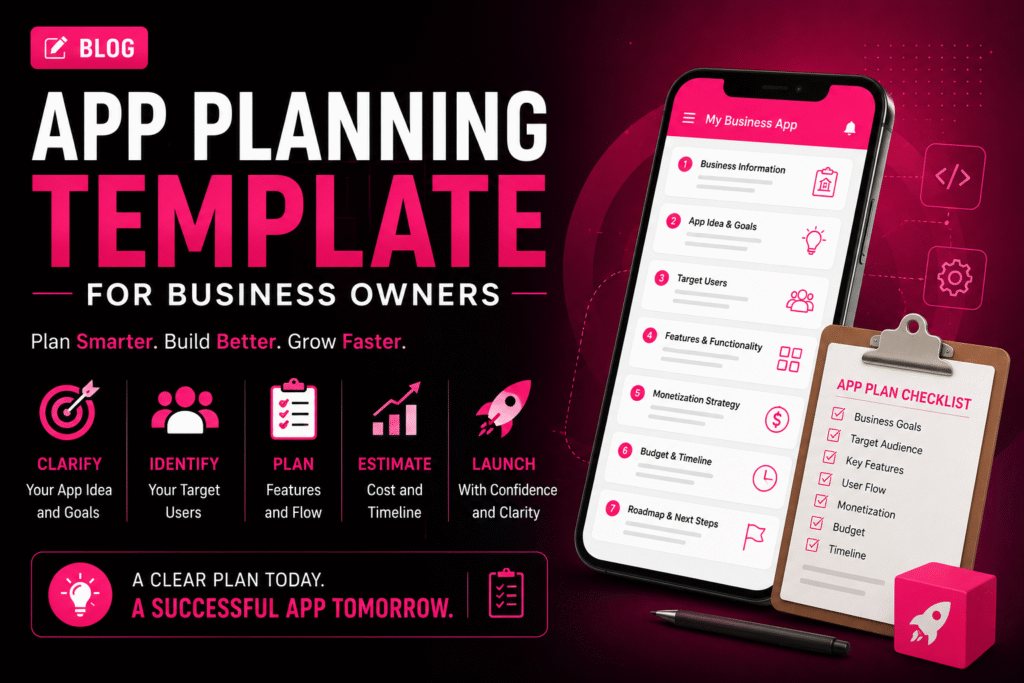
πŸš€ How to Automate Your Business with a Custom App App Planning Template for Business Owners | Crawlers Technologies Template 0 / 22 sections filled Intro Business Info App Idea Users & UVP Features UX & Platform Tech & Integrations Revenue & Budget Timeline & Launch Security & KPIs Partner & Ownership Full Summary Free Template Β· App Planning Β· Fillable App Planning Templatefor Business Owners Fill in each section before approaching a development company. A well-prepared plan reduces development cost, saves time, and gives your app the best chance of success. πŸ’‘ 22 Sections ✍️ Fully Fillable πŸ“‹ Competitor Research πŸ’° Budget Planner πŸ—ΊοΈ User Journey πŸ“Š KPI Tracker πŸš€ Launch Strategy Fill each section as you go Section 01 – 02 01Business Information This helps your development team understand the business context before discussing technology. Business Name Industry Business Location Website Current Business Model Main Products / Services Current Customer Base 02Define Your App Idea My App Idea (one or two sentences) Keep it simple. If you can explain the idea clearly in one sentence, it becomes far easier to define the required features. Section 03 – 04 03What Problem Will Your App Solve? This is one of the most important sections. Your app should solve a real problem β€” not simply exist as another digital channel. Current Customer Problem How Customers Currently Solve It How My App Will Improve It 04Identify Your Target Users Primary Users Age Group Location Customer Type Main User Needs Biggest User Pain Point Section 05 – 06 05Define Your Unique Value Proposition Complete this sentence Better pricing Faster service Easier booking Better UX Exclusive products Local availability Personalised service Faster delivery 06Research Your Competitors Study negative reviews β€” they reveal gaps your competitors haven’t solved yet. Competitor Name Main Features Strength Weakness What can my app do better? Section 07 – 09 07Decide Your App Platform Click to select all that apply. πŸ€–Android 🍎iOS 🌐Web App πŸ–₯️Admin Dashboard 08Create Your Feature List Click each feature to select it for your project. πŸ‘€ User Features Registration / Login User Profile Search & Filters Product / Service Listings Booking / Cart Online Payment Order / Booking Tracking Push Notifications Reviews & Ratings Customer Support / Chat βš™οΈ Business Features Admin Dashboard Customer Management Order Management Inventory Management Reports & Analytics Employee Management Offers & Promotions Real-time Dashboards 09Separate MVP from Future Features βœ… Must-Have Features (MVP β€” launch with these) β—‡ Future Features (add after validation) “If I could launch with only 5 features, which ones would they be?” β€” Those are your MVP features. Section 10 – 11 10Plan Your App Screens My Required Screens (list them) Common Screen Checklist Splash Screen Login / Registration Home / Dashboard Search & Filter Product / Service Detail Cart / Booking Checkout / Payment Order Confirmation User Profile Notifications Support / Help Admin Panel 11Map the User Journey Think through what happens from the moment someone opens your app to completing an action. πŸ“±Open App ↓ πŸ‘€Login / Register ↓ πŸ”Browse Services / Products ↓ β˜‘οΈSelect & Choose Date/Time ↓ πŸ’³Make Payment ↓ βœ…Confirmation & Notification My Custom User Journey Section 15 – 17 15List Required Integrations Payment Gateway (Razorpay / Stripe) Google Maps / Location WhatsApp API SMS / OTP Service Email Service CRM System ERP / Accounting Software Social Login (Google / Facebook) Cloud Storage (AWS S3 / Firebase) Analytics (Firebase / Mixpanel) Other Integrations 16Plan Backend & Cloud Infrastructure Database Preference Cloud Hosting Questions for Your Development Team 17Plan App Security Secure login (OTP / email) Strong authentication (2FA) Data encryption at rest and transit HTTPS across all endpoints Secure APIs with token auth Role-based access control Database protection Regular automated backups Security testing before launch Section 12 – 13 12Decide How Your App Will Make Money Click your revenue model(s). πŸ›’ Direct Sales Sell products or services through the app πŸ” Subscription Charge users monthly or annually πŸ’Έ Commission Take a percentage from each transaction πŸ“£ Advertising Generate revenue through in-app ads πŸ†“ Freemium Free basic, paid premium features 🎯 Lead Generation Convert app users into business leads 13Set Your Budget Development cost is only one part of the total app investment. Expense Category Estimated Budget (β‚Ή) 🎨 UI/UX Design πŸ“± App Development βš™οΈ Backend Development πŸ§ͺ Testing & QA ☁️ Cloud Hosting (Annual) πŸ”— API Costs (Annual) πŸ“± App Store Fees πŸ”§ Maintenance (Annual) πŸ“£ Marketing πŸ’° Total Estimated Budget Section 14 & 22 14Set Your Timeline & Milestones Milestone Target Date 🎨 UI/UX Design Completion πŸ’» MVP Development Complete πŸ§ͺ Testing & Bug Fixes πŸš€ App Store Submission πŸ“£ Launch & Marketing Start Target Launch Date 22Create a Launch & Marketing Plan Instagram & Facebook Google Ads Meta Ads SEO & Content Marketing Influencer Marketing WhatsApp Marketing Email Marketing Referral Programs App Store Optimization (ASO) My Launch Strategy Section 18 18Define Your Success Metrics Don’t measure success only by downloads. Define meaningful business KPIs. πŸ“₯Downloads Target πŸ‘₯Monthly Active Users πŸ“Registrations πŸ›’Orders / Bookings πŸ’°Revenue Goal πŸ”Customer Retention 🎯Conversion Rate ⭐Customer Satisfaction Section 19 – 21 19Choose Your Development Partner Portfolio reviewed β€” live apps seen Relevant industry experience confirmed Technical expertise validated UI/UX capabilities reviewed Development process explained Testing process confirmed Security practices discussed Communication frequency agreed Pricing is fully transparent Post-launch support confirmed 20Clarify Ownership Before Signing Source code ownership β€” in writing UI/UX design files handed over Database ownership confirmed Documentation included in handover Domain owned by you Cloud and App Store accounts in your name Intellectual property terms in contract 21Plan Post-Launch Support Bug fix process and SLA agreed Security update schedule planned OS compatibility updates covered Server and performance monitoring New feature roadmap planned Customer feedback loop established Maintenance budget separated from build cost Complete Template πŸ“ Your Complete App Planning Summary A condensed one-page view of your entire plan. Fill this in and share it with your development team as the starting brief. πŸ’‘ Business Business Name Industry Business Goal πŸ“± App App Name

DEVELOPMENT

πŸ“± Free Checklist Before Building Your App

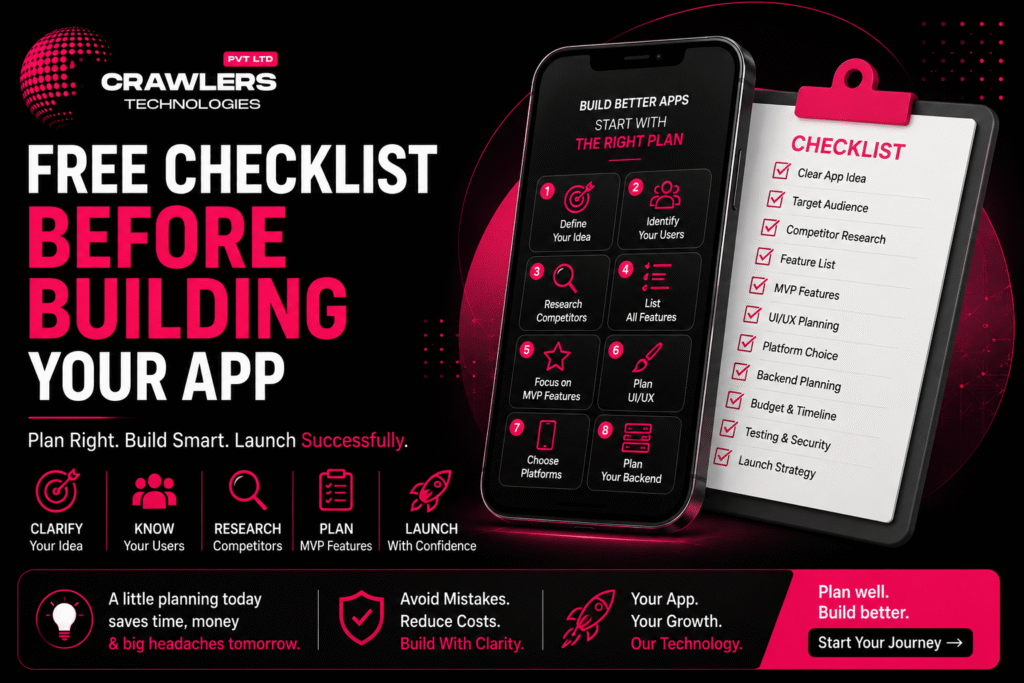
πŸš€ How to Automate Your Business with a Custom App Free Checklist Before Building Your App | Crawlers Technologies 0 / 0 completed Intro Define Your Idea Features & MVP Tech & Backend Budget & Timeline Security & Testing Partner & Launch Full Checklist Final Thoughts Free Resource Β· App Planning Free ChecklistBefore Building Your App Don’t spend a rupee on development until these questions are answered. This interactive checklist covers everything β€” from idea to launch β€” so your app project starts right. πŸ’‘ Idea Definition 🎯 Target Users πŸ“ Features & MVP πŸ“± Platform Choice πŸ’° Budget Planning πŸ” Security πŸ§ͺ Testing πŸš€ Launch Strategy Click each item to check it off Steps 1 – 3 01Define Your App Idea Before talking to developers, clearly explain what your app is supposed to do. If you cannot explain your idea in one sentence, spend more time on the planning stage first. I can explain my app idea in one sentence I know the specific problem I’m solving I know my target audience I understand my app’s main purpose I know what makes my idea different from competitors 02Identify Your Target Users Your app should be designed for a specific audience. An app for college students has very different requirements from one built for business owners. Age groupLocationCustomer type InterestsProblemsTech preferences Target audience clearly identified Customer problems understood User behaviour and buying patterns researched User expectations identified 03Research Your Competitors Don’t build your app without studying similar products. Negative reviews are goldmines β€” they reveal problems your competitors haven’t solved yet. Google Play Store Apple App Store Google Search Social media Competitors identified and listed Competitor features compared Customer reviews β€” especially negative ones β€” studied Competitor weaknesses identified My unique competitive advantage defined Steps 4 – 6 04Create a Feature List Write down every feature you’re considering β€” then separate them into essential and future categories. Don’t build everything in version one. βœ… Essential Features (Build Now) User registration & login Core product or service listing Search & filter Checkout & payment Order / booking tracking Push notifications β—‡ Future Features (Build Later) AI-powered recommendations Loyalty & referral programs Advanced analytics Voice search Multi-language support Social sharing 05Decide Your MVP Features An MVP (Minimum Viable Product) is the first version containing only the features needed to test the idea. It reduces initial cost and validates the concept before full investment. “If I could launch with only 5 features, which ones would they be?” β€” Those are your MVP features. Core problem clearly identified Must-have features listed and agreed Nice-to-have features separated from essentials Future features documented for later phases MVP scope finalized and agreed with team 06Plan Your UI/UX Before development starts, map how users will move through the app. You don’t need a final design β€” a basic user flow makes developer discussions far easier and more accurate. Open App β†’ Sign Up β†’ Browse β†’ Select β†’ Action β†’ Confirmation Main screens identified User journey mapped from open to completion Navigation structure planned Branding requirements defined (logo, colours, fonts) UI/UX requirements discussed with development team Steps 7 – 9 07Choose Your Platform Decide where your app needs to be available. The right choice depends on your audience, performance requirements, features, budget, and long-term plans. πŸ€– Android Best when your target audience primarily uses Android devices 🍎 iOS Important when your audience includes significant iPhone users πŸ’™ Both (Flutter) Cross-platform for broad coverage at lower development cost 08Plan Your Backend Many businesses focus only on the mobile interface and forget the backend. A strong backend foundation becomes critical as your app grows. Ask your development company: “What backend architecture will this app need?” πŸ‘€ User accounts πŸ—„οΈ Databases πŸ’³ Payments πŸ“¦ Orders πŸ”” Notifications πŸ”‘ Authentication βš™οΈ Business logic πŸ“Š Reports 09List Required Integrations Create a complete list of all third-party services before development begins. This helps your team estimate the project more accurately β€” and avoids nasty surprises mid-build. πŸ’³ Payment gateways πŸ—ΊοΈ Google Maps πŸ’¬ WhatsApp API πŸ“± SMS providers πŸ“§ Email services πŸ—„οΈ CRM / ERP πŸ“Š Accounting software πŸ” Social login ☁️ Cloud storage πŸ“ˆ Analytics tools Android / iOS platform requirements decided Technology approach (Native / Flutter / React Native) discussed Backend requirements identified and documented All required APIs and integrations listed Steps 10 – 11 10Set a Realistic Budget Don’t consider only the development cost. Your total app investment includes much more than what a developer quotes you on day one. ❌ Wrong Question “How much does it cost to build the app?” βœ… Right Question “How much will it cost to build, launch, operate, and grow the app?” 🎨 UI/UX design πŸ’» App development βš™οΈ Backend development πŸ§ͺ Testing ☁️ Cloud hosting 🌐 Domain πŸ”— API costs πŸ’³ Payment gateway fees πŸ“± App Store fees πŸ”§ Maintenance πŸ“£ Marketing Development budget set with realistic expectations Hosting and cloud infrastructure costs considered API and third-party service costs included Ongoing maintenance budget planned App marketing budget allocated 11Define Your Timeline Set realistic expectations. A simple MVP takes far less time than a complex marketplace or enterprise application. Target launch date defined and agreed MVP deadline defined Development milestones planned Testing period included in the schedule App Store submission time accounted for (7–14 days) Steps 12 – 14 12Think About Security Security is not an afterthought. If your app handles financial, healthcare, personal, or business information, security planning starts before a single line of code is written. User authentication method decided (OTP, email, social) Data encryption requirements discussed Secure APIs planned from day one Payment security requirements identified Role-based access control planned Database security and backups included 13Plan for Testing Never assume an app is ready just because coding is complete. Testing should catch bugs before your customers do β€” not after. Functional testing included in project plan UI and usability testing planned Performance and load testing included Device compatibility testing across Android and iOS API and integration testing planned Security testing included

DEVELOPMENT

πŸš€ Agile Development Process Explained for Clients

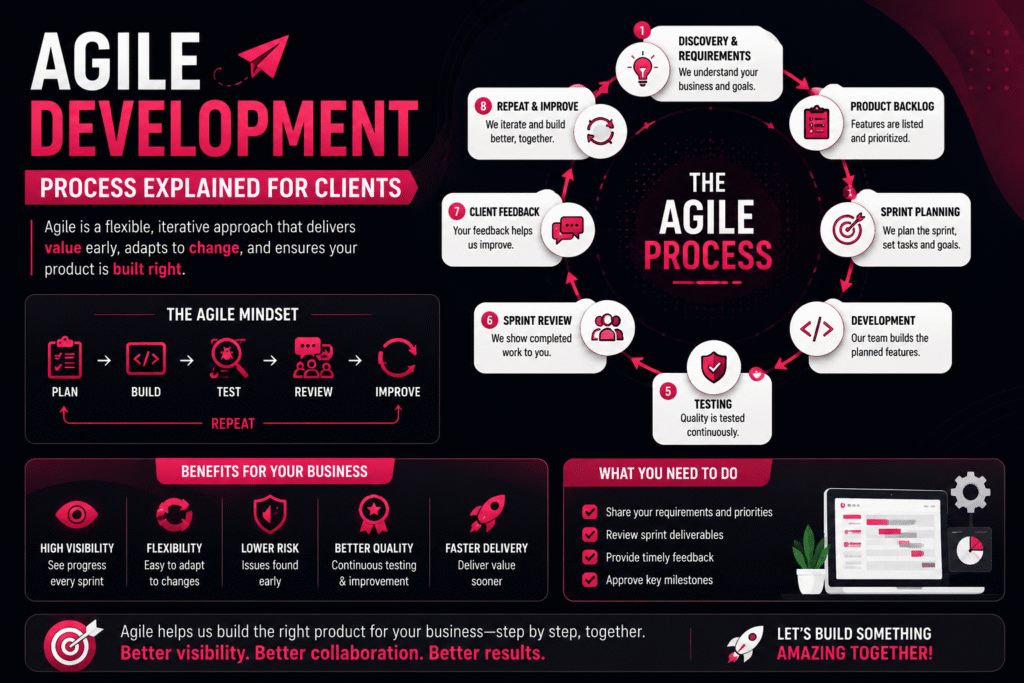
πŸš€ How to Automate Your Business with a Custom App Agile Development Process Explained for Clients | Crawlers Technologies Intro What Is Agile The Process Backlog & Sprints Review & Feedback Launch Agile vs Traditional Client Role Myths & Benefits Client Guide Β· Software Development Agile DevelopmentExplained for Clients Stop waiting months to see progress. Agile breaks your project into small, reviewable stages so you’re always in control β€” with feedback at every step. πŸ”„ Sprints πŸ’¬ Feedback Loops πŸ§ͺ Continuous Testing πŸš€ MVP Launch πŸ“Š vs Traditional 🧠 Myths Busted Scroll to explore The Foundation What Is Agile Development? Agile is a flexible software development methodology focused on continuous delivery, real client feedback, and incremental improvement β€” instead of building everything in one go. Traditional vs Agile β€” The Core Difference ❌ Traditional Planβ†’ Build Everythingβ†’ Testβ†’ Launch You see the result only at the end β€” months later. βœ… Agile Planβ†’ Buildβ†’ Testβ†’ Reviewβ†’ Improveβ†’ Repeat You see working features every 1–4 weeks. Agile Core Principles πŸ” Continuous development πŸ’¬ Regular client feedback πŸ§ͺ Frequent testing πŸ“ˆ Incremental improvements πŸ”“ Flexible requirements The Agile Cycle πŸ—ΊοΈPlan β†’ πŸ’»Build β†’ πŸ§ͺTest β†’ πŸ‘€Review β†’ πŸ’¬Feedback β†’ ⚑Improve β†Ί How It Works The Agile Process β€” Step by Step An Agile project follows clear, repeatable stages that give you visibility and control throughout the entire build. Step 01 Discovery & Requirement Gathering The project begins by deeply understanding your business β€” goals, customers, features, competitors, budget, and timeline. The output is a clear product roadmap. Business Goals Target Customers Required Features Budget & Timeline Technical Requirements Step 02 Creating the Product Backlog A prioritized list of everything the application needs. The most important features are developed first, so you always get maximum value early. Step 03 Sprint Planning The project is divided into sprints β€” focused development cycles of 1–4 weeks. During planning, the team decides which features to build, who works on what, and what the sprint goal is. Building Blocks Backlog & Sprint Execution πŸ“ Example Product Backlog β€” E-Commerce App Features are listed and prioritised before development begins. High-priority items are built first. #01User registration #02Login & auth #03Product catalog #04Search #05Shopping cart #06Payment #07Order tracking #08Push notifications #09Admin dashboard πŸ’» Development β€” During Each Sprint Developers focus only on the features selected for that sprint β€” not the whole app. This keeps work focused and quality high. Frontend development Backend development API integration Database setup UI implementation πŸ§ͺ Testing Throughout Development Testing happens throughout every sprint β€” not only at the end. Finding bugs early makes them far cheaper and easier to fix. βœ… Functionality ⚑ Performance πŸ”’ Security πŸ“± Device compatibility 😊 User experience Client Involvement Sprint Review & Your Feedback At the end of every sprint, you see real working features β€” not a presentation or a status report. This is where Agile earns its value for clients. πŸ‘€ What You See After Each Sprint 1Login + Registration 2Product Catalog + Search 3Cart + Checkout 4Payments + Order Tracking 5Notifications + Admin Panel πŸ’¬ How Client Feedback Works After each sprint review, you share feedback. The team adds your input to the backlog and prioritises it for a future sprint. “The checkout process should have fewer steps β€” can we consolidate the address and payment into one screen?” This kind of real-time feedback ensures the final product is closely aligned with your actual business needs β€” not a guess made at the start of the project. Going Live Product Launch & Continuous Improvement πŸš€ What the Launch Includes πŸ“± Google Play Store submission 🍎 Apple App Store submission πŸ–₯️ Production deployment βš™οΈ Server configuration πŸ“Š Analytics setup πŸ”’ Security checks πŸ’‘ Agile doesn’t require waiting for every possible feature. You can launch an MVP and keep improving it based on real user feedback β€” saving budget and getting to market faster. πŸ”„ Continuous Improvement After Launch Agile development doesn’t end at launch. The same cycle continues to evolve and improve the product over time. Bug fixes New features Performance improvements Security updates User feedback integration Business requirement changes Head to Head Agile vs Traditional Development A clear breakdown of how these two approaches differ across every important factor. Factor Agile Traditional Development Style Incremental Sequential Client Feedback Frequent throughout Often limited during build Testing Continuous Concentrated at end Flexibility High Lower Progress Visibility High β€” see every sprint Lower β€” mostly at end Handling Changes Easier to accommodate Can be expensive late Product Delivery Incremental releases Usually one final delivery Risk Detected early May surface late Your Part What Does the Client Need to Do? Agile doesn’t mean managing developers daily. Your involvement is structured, lightweight, and high-impact. πŸ“‹ Provide Requirements Explain what your business needs at the start and as things evolve 🎯 Prioritize Features Decide which features are most important for the first release πŸ‘€ Review Sprint Work Check completed features and share honest, timely feedback ⚑ Make Quick Decisions Fast feedback prevents development delays and keeps momentum βœ… Approve Milestones Confirm the project is moving in the right direction at key stages πŸ’° Does Agile Increase Development Cost? Not necessarily β€” Agile can actually help you control costs. Because features are built incrementally, you can identify low-value items early and invest only in what matters. Instead of spending β‚Ή10 lakh building every planned feature, you might launch an MVP first, learn from real users, and invest additional budget only in features that demonstrate real value. Clearing the Air Common Misconceptions About Agile Agile is often misunderstood. Here’s what it actually means β€” and what it doesn’t. “Agile means there is no plan.” Agile involves continuous planning rather than one rigid plan. The roadmap evolves β€” it never disappears. “Clients can change anything at any time.” Agile is flexible, but significant changes still affect scope, cost, and timeline β€” just less than in traditional development. “Agile means no deadlines.” Agile uses sprint goals, milestones, priorities, and delivery schedules. Accountability is built